The foundation of
modern dental practice

Clinical charting, session management, scheduling, payments, and documentation — built by dentists who understand the daily reality of practice management.

100+
Clinical Actions
Surgeries
UK
Data Residency
Free
Starter Tier
Lumina Core Platform
Hover to slow
See more

A clinical operating system for modern dental practices.

Not a digitised appointment book with billing bolted on. A vertically integrated platform where clinical, operational, and financial workflows converge into one seamless experience.

Built for depth, designed for speed.

100+
Clinical Action Types
FDI
Standard Notation
UK
Data Residency
Free
Starter Tier
Clinical Workflow

Less Time Documenting. More Time Chairside.

Every interaction is designed to reduce clicks between patient arrival and treatment start. Context-aware menus surface only what's relevant. The interface feels instant, keeping clinicians focused on the patient rather than the software.

Real-Time Patient Status

Live status updates mean every screen in the practice sees the same patient state: Waiting, In Treatment, or Completed. No whiteboards. No shouting across reception.

Mode-Based Action Menus

The chart operates in distinct modes — Base, Exam, Missing, Monitor — that expose only the relevant actions. Clinicians don't navigate menus. They work in context.

Practice-Wide Emergency Alerts

One button triggers a full-screen emergency overlay on every connected device in the practice — displaying the clinician's name and surgery location. Designed for sedation, paediatric, and surgical contexts.

Charting & Treatment

Comprehensive Clinical Charting. FDI Notation. Surface-Level Precision.

Interactive mouth charts with individual tooth overlays, surface-specific action recording, multi-step treatment workflows, and periodontal charting with keyboard navigation for rapid data entry.

Comprehensive Charting

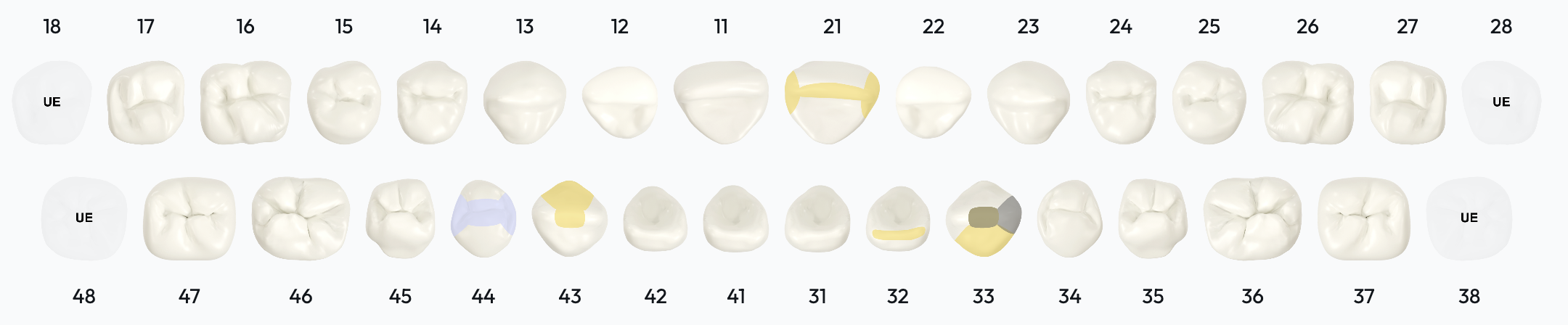
Full-mouth charting with FDI notation and individual tooth overlays. Surface-specific recording for Mesial, Distal, Occlusal, Buccal, and Lingual/Palatal surfaces. Bridge builder, denture designer, and detailed chart views on hover.

  • Direct restorative: Composite, Amalgam, GIC, Fissure Sealant, Core Build-Up
  • Indirect restorative: Crown, Veneer, Inlay/Onlay, Denture, Bridge workflows
  • Endodontics: Root Canal, Re-treatment, Apicoectomy
  • Surgical: Extraction, Complex Extraction, Implant
  • Periodontal: Scaling, Root Planing, Gingivectomy
  • Pathology, Wear, Positional, Emergency, and Monitoring categories

Periodontal & BPE

Dedicated periodontal charting interface with per-site measurement input, surface-by-surface data entry, tooth navigation controls, and keyboard shortcuts for efficient recording.

  • 6-sextant BPE with 0-4 scoring
  • Bleeding, plaque, and furcation indicators per sextant
  • Clinical grading: oral hygiene, gingival health, caries risk, occlusion, aesthetics
  • Start, update, and complete BPE lifecycle tracking
  • Keyboard shortcuts for rapid data entry

Session Management

Drag-and-drop session organiser groups clinical actions into treatment sessions with pricing and duration calculations. Timeline view spans all sessions. Actions move between sessions fluidly.

  • Drag-drop action ordering between sessions
  • Session pricing and duration auto-calculated
  • Timeline modal for cross-session visibility
  • Multi-step workflows (e.g., Crown: Prep → Impression → Temporary → Fit)

Care Plans & Notes

Unified care plan management with status tracking across Pending, In Progress, Approved, Completed, and Recommended stages. Configurable note templates per action type via the form builder.

  • Care plan status lifecycle management
  • Configurable per-action-type note templates
  • Rich text clinical documentation
  • Secure clinical image upload and storage
Session-to-Payment

Every Treatment Delivered. Every Treatment Billed.

The session-based model creates a direct, auditable linkage from clinical actions to billable sessions to payment collection. No treatments slip through the cracks. No manual invoice creation.

Structural Billing Linkage

Clinical actions belong to sessions. Sessions become billable upon completion. Completed sessions with outstanding payments surface automatically. This structural linkage prevents the most common PMS failure: treatments delivered but never billed.

Integrated Payments

Guided payment flow: session selection, method choice (integrated card, external POS, cash, or insurance), confirmation, and processing. Dedicated dashboards for today's payments, outstanding balances, and refunds.

Revenue Visibility

Real-time payment dashboard: total daily revenue, payment method breakdown, transaction count, outstanding amounts with days-pending counters, and reminder functionality for overdue payments.

Versioned Fee Schedules

Manage multiple fee schedules per practice (private, insurance). Chairside pricing display merges schedule data in real time. Pricing templates enable standardisation across practices in a group.

See the full clinical workflow in action.

Book a guided walkthrough with our clinical team.

AI-Assisted Documentation

Reduce the Documentation Burden. Not the Clinical Rigour.

The AI scribe generates dual clinical and patient-facing summaries from structured exam data. It augments clinician documentation — it does not replace clinical judgement.

How the Scribe Works

1

Clinician completes exam checklist, clinical grading, and BPE data during the appointment

2

Clicks 'Generate AI Summary' — structured clinical data is sent to the scribe service

3

System generates two outputs: internal clinician notes and a patient-friendly summary

4

Clinician reviews and edits both outputs before saving

5

Patient summary requires explicit approval before it becomes visible via the patient portal

Confidence Scoring & Guardrails

Before generation, the system calculates what percentage of clinical data has been entered and displays a confidence level. More data in, better summaries out.

High Confidence> 80% data entered
Medium Confidence50–80% data entered
Low Confidence< 50% data entered

At low confidence, the system explicitly recommends completing more clinical sections before generating summaries.

What the AI Does Not Do

The AI operates in a read-only advisory capacity. It reads structured clinical data and produces text suggestions. It is not an autonomous clinical decision system.

Does not modify clinical records
Does not create or delete clinical actions
Does not trigger prescriptions
Does not approve medical histories
Does not process payments
All outputs require clinician review before saving

Voice Recording

In-exam voice note recording with waveform visualisation (up to 5 minutes). Record, playback, download, or delete. Voice recordings supplement generated notes for complete documentation.

Patient Portal

Structured Patient Communication. Your Team Stays in Control.

The patient portal gives patients a clear, self-service experience — without removing practice control. Patients request bookings, submit forms, and make payments. Your team reviews, approves, or modifies every request before it becomes an appointment.

Booking Request Workflow

Patients request appointments — they do not book directly into your diary. Your team reviews each request with full visibility of clinician availability, then approves, rejects (with a reason), or proposes an alternative time. Modified requests go back to the patient for confirmation. The practice always has the final say.

A structured digital alternative to phone calls — without giving up scheduling control.

Patient Self-Service

  • Submit and update medical history online
  • Upload medical documents and assets
  • View clinical reports and grades
  • View session history and payment records
  • Update personal profile information
  • Receive patient-friendly summaries (after clinician approval)
Real-Time Visibility

The Whole Practice on One Screen.

Real-time dashboards surface operational state — not retrospective reports. Waiting room count, next patient, outstanding bookings, lab turnaround, and inventory alerts. All updated live, without refreshing the page.

Landing Dashboard

  • Next patient countdown
  • Patients today
  • In waiting room (live)
  • Bookings remaining

Clinical Portal

  • Today's appointments by time
  • Surgery room status
  • Lab work summary
  • Free time slot identification

Payment Dashboard

  • Daily revenue total
  • Method breakdown (card, cash, insurance)
  • Outstanding with days-pending
  • Refund tracking

Inventory & Lab Tracking

  • Low stock alerts
  • Expiring soon warnings
  • Expired item flags
  • Lab cases: active, completed, on-track
Scheduling

A Visual Calendar Built for Chair Utilisation.

Drag-to-create, drag-to-reschedule, resize-to-extend. Day, week, month, and timeline views. 16+ appointment types with clinical specialisation filtering. Availability checking before approval prevents double-booking.

Visual Diary

Full calendar with drag-drop appointment creation and rescheduling. Colour-coded by appointment type. Configurable practice hours, closures, and blocked slots for lunch, meetings, or maintenance.

Availability Checking

Real-time conflict detection compares requested times against clinician bookings before approval. Surgery selector enables multi-chair scheduling. Free time slot identification surfaces unused capacity.

Status Lifecycle

Bookings progress through Pending → Approved → Settled. Modifications route back to patients for confirmation. Cancellation patterns become visible through structured status tracking.

Audit & Compliance

Clinical Defensibility. Built In From Day One.

Not a compliance checkbox. The audit trail is structural — permanent clinical records, comprehensive activity history, and versioned medical histories that can reconstruct what was recorded, when, and by whom.

Audit Trail Layers

  • Permanent clinical action records — status transitions are recorded, not overwritten
  • Comprehensive activity log captures every platform event with timestamp and user context
  • Full before-and-after change tracking for data integrity
  • Medical history versioning with side-by-side comparison tools
  • 12-month medical history expiry enforcement with automatic flagging
  • Detailed access logging for complete traceability

Operational Compliance

  • Three surgery checklist types: Daily, Weekly, Quarterly — fully configurable
  • Medical history approval workflow with red 'Needs Action' flagging
  • Granular role-based access control with comprehensive action permissions
  • Organisation-scoped data isolation ensures complete practice separation
  • Patient consent capture with digital signature
  • Encrypted, versioned document storage
Multi-Practice

Multi-Practice from the Ground Up. Not a Bolt-On.

Switch between practices instantly, without re-authenticating. Every practice's data is fully isolated. Live updates stay scoped to the right location. Lumina was designed to scale effortlessly across sites.

Instant Practice Switching

A single click switches your entire view to a different practice. All data, live updates, and permissions resolve to the selected location — no logging out, no separate logins.

Workflow Standardisation

Form templates (medical history, clinical notes, surgery checklists), fee schedule templates, shared lab directories, and standardised equipment catalogues — all configurable centrally and deployable across practices.

Complete Data Isolation

Every query is scoped to your organisation and practice. Data never crosses boundaries. Access controls verify practice membership before any data is returned.

Operations

Inventory and Lab Work. First-Class, Not Afterthought.

Most dental PMS systems have zero inventory capability. Lumina integrates stock tracking, lab partner management, and equipment lifecycle into the clinical platform.

Inventory Management

  • Hierarchical storage locations: surgery rooms, storage areas, lab storage
  • Per-location quantity and expiry tracking
  • Three-tier alerting: low stock, expiring soon, expired
  • Equipment transfers between locations
  • CSV import for rapid onboarding from existing systems
  • Alert badge in header with count for immediate visibility

Lab Tracker

  • In-platform lab partner directory with ratings and turnaround times
  • Specialty filtering: Crown & Bridge, Prosthetics, Orthodontics, Implant Restorations
  • Lab-specific form templates for work orders
  • External lab API — labs can query and update their work orders directly
  • Dashboard: total cases, active, completed, on-track metrics
  • Lab partner management with contact info and case history
How It Compares

Traditional PMS vs Lumina Core

CapabilityTraditional PMSLumina Core
Clinical chartingBasic point-and-clickComprehensive action library, FDI notation, surface-level precision, multi-step workflows
Periodontal recordingManual entry or separate moduleIntegrated BPE, per-site measurements, keyboard shortcuts
Billing modelManual invoice creation from recordsSession-to-payment pipeline — treatments auto-aggregate into billable units
Patient communicationPhone calls, manual emailsIntegrated portal with booking requests, reports, and medical history
Clinical documentationTyped notesIntelligent dual output (clinician + patient) with clinician review
Multi-practiceBolt-on or separate databasesNative multi-site support — instant practice switching with full data isolation
Inventory managementSpreadsheet or noneIntegrated stock tracking with expiry alerts and location hierarchy
Lab managementPhone/emailIn-platform directory with dedicated lab partner portal
Audit trailBasic activity logPermanent records, comprehensive activity history, version comparison
Real-time statePage refreshLive patient status, emergency alerts, instant dashboard updates
Forms & Medical History

Dynamic Forms. Not Static Templates.

The form builder supports drag-and-drop canvas design with conditional logic, custom field types, and practice-specific customisation. Medical history forms, clinical note templates, and surgery checklists evolve with the practice.

Form Builder

Drag-drop canvas with palette, properties panel, and conditional field display. Supports text, textarea, checkboxes, pill buttons, date inputs, phone masks, signature capture, and drug lookup with autocomplete.

Medical History

Versioned records with 12-month expiry enforcement. Approval workflow with 'Needs Action' flagging. Alert extraction from form responses. Side-by-side version comparison across submission history.

Surgery Checklists

Three configurable checklist frequencies — Daily, Weekly, Quarterly — built through the same form builder. Enforces pre-surgery safety verification before clinical work begins.

Who It's For

Who Lumina Is Designed For

Whether you're running a single surgery or a growing group, Lumina is built for practices that want to do things properly — and feel supported while they do it.

Multi-Site Operators

Standardise workflows, pricing, and compliance across every location. Switch between practices instantly and maintain full visibility from a single login.

Growth-Focused Practices

Start with a single surgery on the free tier and scale seamlessly. Lumina grows with you — adding clinicians, surgeries, and locations as your practice expands.

Compliance-Conscious Teams

Detailed audit trails, medical history versioning, surgery checklists, and role-based access control. Built for practices that take clinical governance seriously.

Efficiency-Driven Clinicians

Reduce time spent on documentation with AI-assisted notes, context-aware charting, and a session-to-payment workflow that ensures nothing falls through the cracks.

Solo Practices That Want More

You don't need to be a large group to benefit from a modern platform. If you value structured workflows, a patient portal, and integrated payments — Lumina is for you.

Commercially Minded Owners

Pricing intelligence, revenue dashboards, and real-time operational visibility. Understand your margins, track performance, and make data-informed decisions.

Platform

Built on a Modern, Secure Cloud Platform

Lumina runs on enterprise-grade cloud infrastructure hosted in the UK. Every component is designed for reliability, real-time performance, and the security standards that healthcare demands.

Enterprise-Grade Security

Role-based access control, encrypted data at rest and in transit, and organisation-scoped isolation that ensures your data stays yours.

UK Data Residency

All data hosted in UK data centres. Designed for compliance with UK healthcare regulations and data protection requirements.

Real-Time Performance

Live updates across dashboards, patient status, and practice-wide alerts. No page refreshes, no delays — just instant visibility.

Scales With You

From a single surgery to hundreds of locations, the platform scales automatically. No capacity planning, no infrastructure decisions, no downtime.

Replace Your PMS. Not Your Clinical Judgement.

Start with the free tier. Explore the full clinical workflow. Bring your team when you're ready.

Free tier available · No credit card required · All clinical features included